
The YubiKey user who thinks they are safe
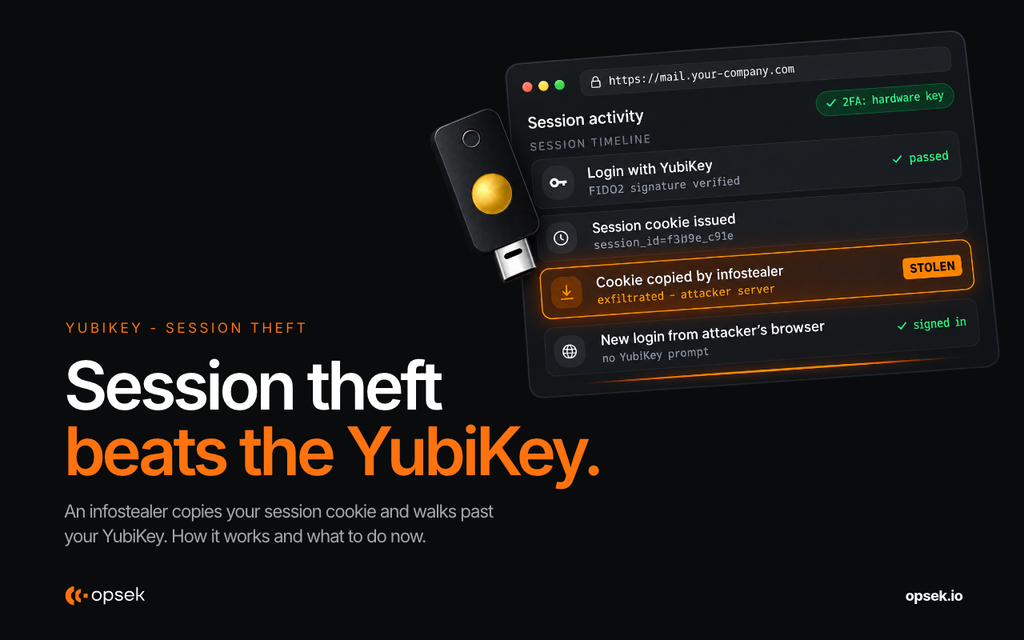
We recorded an attack on an account protected by a YubiKey. An infostealer on the victim’s laptop copies the browser session cookies, the attacker loads them on their own machine, and they are logged in without the YubiKey ever being asked for. The key did its job at login, but the session created after login is a separate thing it does not protect. In this article we break down how the attack works, where an EDR would have detected it, what an MDM adds on top, and the setup we recommend for anyone holding sensitive accounts or assets.
What YubiKeys protect you from
A YubiKey is a hardware key used as a second factor. When you register it on a site that supports FIDO2/WebAuthn (the standard behind security keys and passkeys), the credential stored on the key is bound to that site’s domain. On a phishing page with a lookalike domain, there is no matching credential, so the key does not sign anything and the attacker gets nothing to replay.
We recommend enabling it on every account that supports it. If you are unsure how using it as a security key differs from using it as a passkey, we covered it in YubiKey security key vs passkey: what actually changes in your login flow.
Compare that with other 2FA methods. TOTP codes (the 6-digit codes from an authenticator app) can be stolen and phished like a password: a fake page asks for the code, you type it, the attacker relays it in real time.If you use your phone number, you expose yourself to SIM swap attacks, where an attacker convinces your carrier to move your number to their SIM card and receives your codes.Without one, you stay exposed to phishing, which keeps getting more convincing.
YubiKeys can also protect offline data. KeePassXC (a local password manager), for example, supports challenge-response with a YubiKey, so the password database cannot be opened without both your master password and the physical key. Our cheatsheet shows how to set up KeePassXC with YubiKey challenge-response.
Passkeys are great, until you store them in the wrong place
A passkey is an authentication method that replaces your password with a cryptographic key-pair. Passkeys were designed to live in the secure hardware of your device, where the private-key is created and never leaves (the Secure Enclave on Apple, the TPM on Windows).
Most people store their passkeys in a password manager or cloud account (iCloud Keychain, Google Password Manager, 1Password, Bitwarden). A synced passkey is still bound to the real domain, so it still stops phishing, but it moves the risk to wherever it is stored. If that account is compromised, or the vault is unlocked on an infected laptop, the attacker gets every passkey and password in one place. Keeping passkeys for your most critical accounts on a YubiKey avoids that single point of failure.
Storing TOTP seeds (the secret that generates your 6-digit codes) in the same password manager as your passwords has the same problem, only worse. MFA works because an attacker needs two separate things to get in. If both live in the same vault, stealing that vault gives them both at once, and your two factors become one.
So consider your password manager one of your most sensitive accounts. Protect it with a YubiKey, and keep hardware-bound keys for your critical accounts rather than credentials synced into the same vault.
What YubiKeys do not protect you from
Here is the limit. A YubiKey protects the login, not what happens after.
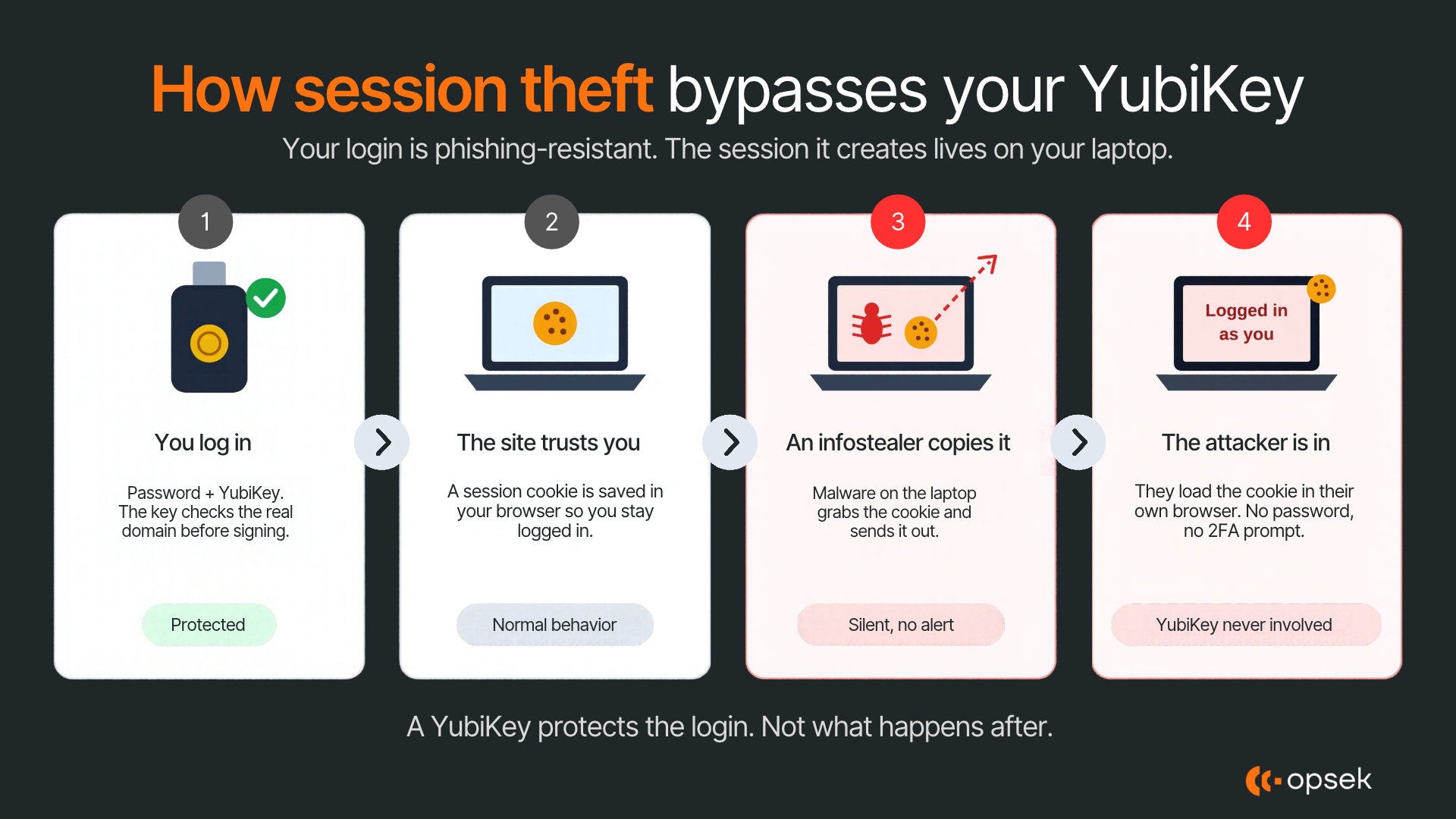
When you log in, the website gives your browser a session token: a small piece of data, usually stored in a cookie, that tells the site “this person already authenticated, let them in.” It is why you do not touch your key every time you open a new page.
That token sits on your laptop. If malware copies it, the attacker loads it into their own browser and is logged in as you. No password, no second factor, no YubiKey. The key did its job at login, and it is simply not part of the story anymore.
What it looks like in real life
We built a proof of concept to show it. The account in the video is protected by YubiKeys. The laptop has no EDR.
Session theft past a YubiKey: video
In the video, the victim logs into an account protected by a YubiKey, as usual. Their laptop is already infected with an infostealer, which copies the browser’s session cookies and sends them to the attacker. The attacker loads those cookies into a browser on their own machine and opens the account as the victim, without logging in and without being asked for the YubiKey.
This works because the YubiKey is only used at login. Once you are logged in, the site keeps you signed in with a session cookie, and whoever holds that cookie is treated as you. Nothing on the victim’s side shows that it happened.
What EDR does, and what it does not
EDR (Endpoint Detection and Response) is security software that watches what happens on your machine in real time: which processes start, what files they read, where they connect. When something behaves like malware, it can kill the malicious process, alert a security team and isolate the device from the network before the damage spreads.
The most known ones are CrowdStrike (Falcon) and SentinelOne (Singularity).
The laptop in the video had no EDR, so nothing reacted when the infostealer ran. With an EDR installed, the infostealer reading the browser’s cookie files and sending them to an unknown server is the kind of behavior it is designed to flag. Depending on how it is configured, it can kill the process before the cookies leave the machine, isolate the laptop from the network, and alert you or your security team, so the stolen sessions can be revoked before the attacker uses them.
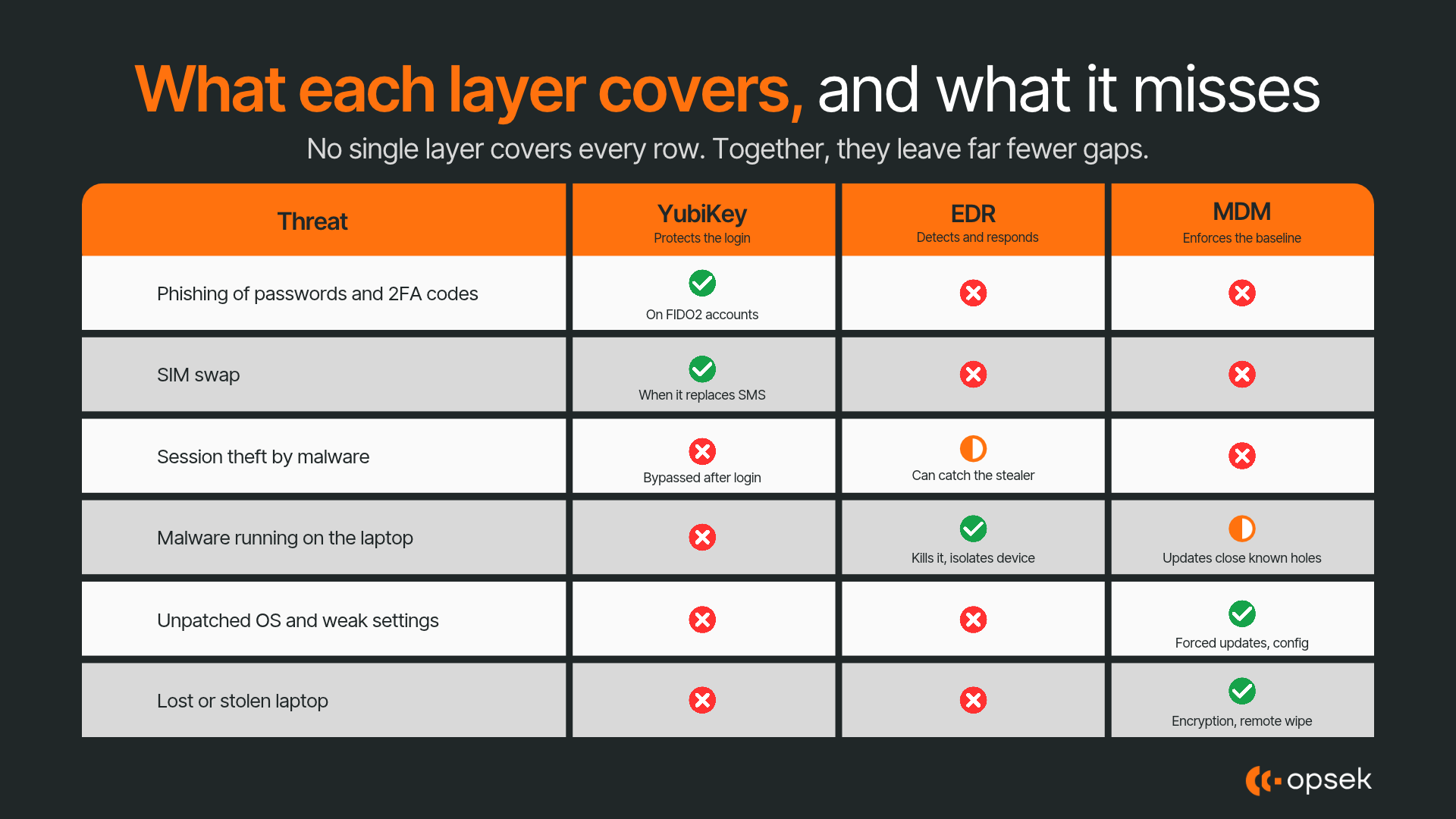
However, an EDR will not stop you from typing a TOTP or SMS code into a phishing page. That is the YubiKey's job. It does not protect your accounts on other devices. And advanced attackers can sometimes evade it. EDR only protects the device it is installed on.
“But wait, the EDR is very invasive.”
To be clear, yes. It sees a lot of what happens on your device.
Now simple questions. Do you wanna be protected? Do you wanna know if you are under attack?
See it as a bodyguard: a bit less privacy, more security.
For anything you do not want done from the machine running the EDR, a great idea is to use a semi-air-gapped device, meaning a machine kept mostly isolated and used for one purpose only. You can buy a Chromebook to sign your transactions, for example. Do not install anything on it. Limit the attack surface and the likelihood of having it compromised.
What MDM adds
MDM (Mobile Device Management) is software that lets you manage a laptop or phone remotely and enforce security settings on it. It does not detect attacks. Its job is to make sure the device is configured safely and stays that way: the operating system is kept up to date, disk encryption is turned on, risky settings are locked down, and a lost or stolen laptop can be wiped remotely. Without it, these things depend on each person remembering to do them.
Jamf is one of the best options, but it only supports Apple devices (macOS and iOS/iPadOS).
MDM and EDR solve different parts of the same problem. MDM lowers the chance that a device gets compromised in the first place, for example by closing the vulnerabilities that malware uses to get in. EDR assumes something will eventually get through, and watches for it so it can stop it before your session cookies or files leave the machine. The YubiKey covers what neither of them can: phishing attempts against your accounts, wherever you log in from. Together, the three cover the device, the activity on it, and the accounts you use it for.
What to do next
You wanna make it hard for attackers, do not be the easy target, and level up your security?
Start here:
- 1 YubiKey 5C Nano that stays in your laptop for daily logins.
- 2 YubiKey 5C NFC as backups (and for your phone over NFC), so losing one key never locks you out of your accounts.
- Register all three keys on every account that supports FIDO2/WebAuthn, starting with your email, your password manager and your exchanges.
- Protect your password manager with a YubiKey, and do not keep TOTP seeds or critical passkeys in the same vault as your passwords.
- EDR + MDM on your work device: CrowdStrike or SentinelOne for EDR, Jamf if you are on macOS.
- A dedicated Chromebook for signing transactions and other sensitive actions, with nothing installed on it.
For the YubiKey setup, follow our YubiKey cheatsheet on GitHub.
More guides and security alerts on the Opsek blog.