
Crypto holders are being researched right now
Chainalysis documented 46 violent attacks on crypto holders worldwide in the first half of 2026, and home invasions went from 14% of cases in 2025 to 37%. France alone recorded 77 crypto-related kidnapping and extortion cases in those six months, according to Interior Minister Laurent Nuñez, compared with 45 in all of 2025. Jameson Lopp’s public archive of physical attacks on crypto holders now lists more than 750 cases going back to 2014. According to Chainalysis, victims are “selected through exposed information, whether from data breaches, social media activity, or insider knowledge.
Attackers find that information through OSINT (open-source intelligence): research built entirely from public or leaked sources. Preventive OSINT means front-running the attacker, so you can close the gaps first.
Each of the three sources Chainalysis names has a recent example.
- Data breaches. In May 2025, Coinbase disclosed that criminals had paid support contractors outside the US to copy customer records: names, home addresses, phone numbers, emails, government ID images, and balance snapshots. Coinbase warned the data could be used in social engineering attempts. According to its filing with the Maine attorney general, 69,461 people were affected.
- Insider knowledge. In France, a tax official in Bobigny has been in custody since June 2025, accused of using the tax administration's internal software to look up home addresses for a criminal sponsor. According to Le Parisien, as reported by bitcoin.fr, her searches included people who had declared crypto gains or holdings.
- Social media. Thist one is about you and the people around you. It is the part you can see and change, so it is where to start.
Start by Googling yourself
Set aside half an hour and open a private browser window, so your search history and signed-in accounts don’t skew the results. Run each search below, replacing the placeholders in brackets with your own details.
Your full name, alone and combined with your city, your company and a few search operators:
- "[FULL NAME]"
- "[FULL NAME]" "[CITY]"
- "[FULL NAME]" "[COMPANY]"
- "[FULL NAME]" filetype:pdf
- "[FULL NAME]" -site:linkedin.com -site:facebook.com -site:instagram.com
The last two tend to surface what you didn’t know was out there: PDFs such as attendee lists or old CVs, and pages outside the profiles you already control.
Every phone number you have used in the last ten years, written a few different ways:
- "[PHONE NO SPACES]"
- "[PHONE WITH SPACES]"
- "[PHONE WITH DASHES]"
- "[PHONE INTERNATIONAL]"
For example, a US number would be searched as 2025550123, 202 555 0123, 202-555-0123 and +1 202 555 0123.
Your personal email addresses, plus the username part on its own, since people often reuse it as a handle elsewhere:
- "[EMAIL]"
- "[EMAIL USERNAME]"
Your current home address and previous ones:
- "[STREET AND NUMBER]" "[CITY]"
- "[FULL NAME]" "[STREET NAME]"
Your profile photo, using a reverse image search. Try several engines, because each one indexes different sources:
- Google Lens
- Bing Visual Search
- Yandex Images (usually the strongest at matching faces)
- TinEye
- PimEyes
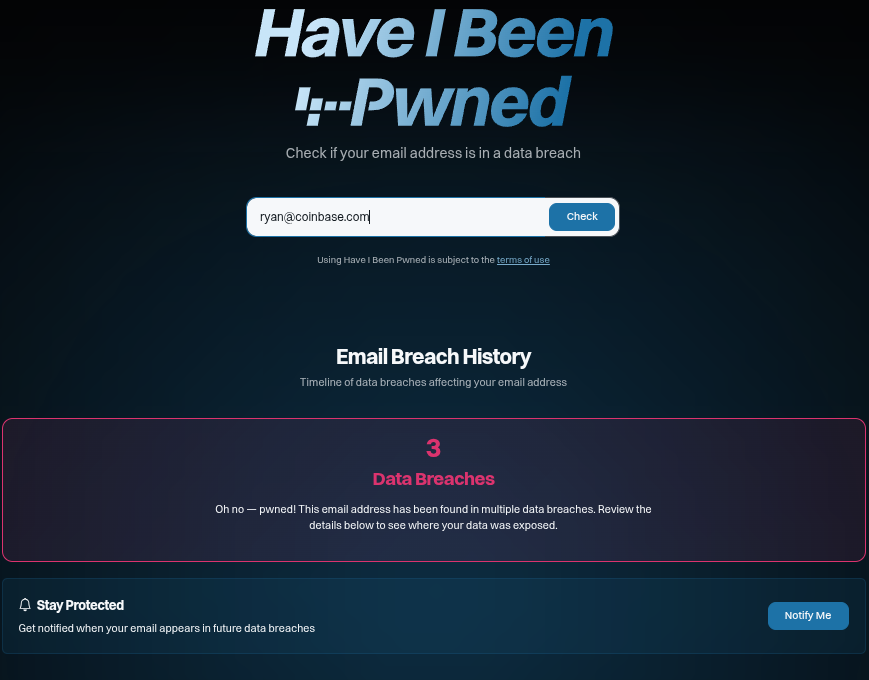
Finally, check each of your email addresses on Have I Been Pwned to see which known data breaches they appear in.
What your own search will miss
A search engine shows you the top layer. Someone who is seriously targeting you keeps going, and the deeper layers are the ones that can hurt most.
Data brokers and public records. People-search sites show a teaser on Google and a full profile behind it: address history, relatives, phone numbers, sometimes an estimate of your wealth. These sites are tapping into voter registrations, campaign contribution disclosures and vehicle registration data. Underneath them sit public records such as property deeds, company filings and court cases, and you cannot ask anyone to delete those.
Breaches and stealer logs. Every breach that included your email also included something else: a password, a phone number, an address, sometimes a scan of your ID. Searching leaked passwords and the accounts tied to them is by far the most successful breach data tactic of most investigations. Stealer logs go further. They are the files that malware pulls off an infected computer: saved passwords, session cookies that can let someone into your accounts without the password, autofill data and a screenshot of your desktop. Autofill data alone can be enough to get a name, date of birth, home address, email, mobile number, vehicle and partial card details. Have I Been Pwned tells you which breaches included your email. It cannot tell you what someone can assemble from all of them together, and this is not data you should go looking through yourself.
The threads between your identities. A pseudonymous X account, a GitHub handle and your LinkedIn profile look like three separate people. They stop being separate the moment they share a username, a phone number, a recovery email, a password or a photo. For crypto holders the same logic connects a wallet to a name: an ENS name, a donation tweet, a screenshot. Once that link exists, your balance is public, permanently.
Your family is part of your attack surface
Chainalysis estimates that 25 to 30% of violent crypto incidents in early 2026 targeted a family member or acquaintance instead of the holder. In late October 2026, in Mont-de-Marsan in southwest France, three hooded men broke into the home of a couple in their sixties at around 3 a.m., tied them up and, according to Sud Ouest, demanded cryptocurrency. Their son works in crypto and lives at a different address. Investigators reportedly believe he was the real target, and he has been placed under police protection.
You can lock down every account you own and still be one search away through the people who love you. A parent posts a birthday photo with your face and the name of their street. A teenager tags their school, their club and their weekend plans. A spouse's LinkedIn names the company you co-founded. A wedding website or a family obituary maps everyone in a few minutes. None of these people are being careless. They are living normally, and an attacker's job is to find the least protected path to you.Exercise: find your own family
Set a timer for 15 minutes and try to do what an attacker would. Starting only from your public profiles on LinkedIn, X, Facebook and Instagram, see how many relatives you can identify.
Check who interacts with you. Look at your followers, friends lists, and the people who like or comment on your posts. Shared last names and comments like “so proud of you, son” give relatives away fast.
Check where you are tagged. Photos other people posted of you, especially birthdays, holidays and weddings, often name everyone in the frame.
Search your last name. Each line is a separate search:
- "[LAST NAME]" "[CITY]" site:facebook.com
- "[LAST NAME]" "[CITY]" site:instagram.com
Open their profiles. For each relative you find, check what their account reveals about you: photos of you, your house, your kids, where you spend holidays, where you work.
When the timer runs out, answer three questions:
- How many relatives did I find?
- Which one has the most public profile?
- What could someone learn about me from that person alone?
The person in your answer to question 2 is your least protected path, and that is where an attacker would start.
Why you cannot fully assess yourself
Searching for yourself is worth doing, but it is not an assessment. Here are four reasons why.
You already know the answers. When an old username or your mother's maiden name shows up in a result, it reads as noise because it is familiar. To an attacker it is a key.
Expertise. A gym check-in, a school jersey in the background of a photo and a county property record are each harmless. Together they are a schedule and an address. Connecting them is a skill, and it is hardest to apply to your own life.
The most damaging sources are off limits to you. Breach collections and stealer logs come with legal and ethical lines, and handling them safely takes infrastructure that most people do not have and should not build.
You are not the only person on the list. A real picture covers the people an attacker would use to reach you, which means looking at them too, with their consent.
What an OSINT assessment gives you
An OSINT assessment is that same research, done by people on your side, before anyone else does it. We are not going to publish our playbook, but the outcome is easy to describe.
- The profile an attacker would build. What a motivated stranger can learn about you and your close family: current and past addresses, phone numbers and the SIM-swap risk attached to them, email addresses and the passwords exposed with them, identity documents in circulation, relationships, routines and signals of wealth.
- Each finding is tied to the attack it enables. A home address enables a physical attack. A phone number and its carrier enable a SIM swap. A leaked password enables an account takeover. Public video enables a deepfake. Family names and schools enable coercion and fake-emergency calls.
- A mitigation plan. What can be removed, what should be changed, and how to compensate for what cannot be removed.
- A baseline. Your exposure changes after a breach, a review, a public talk or a wedding. Running the assessment again shows whether the fixes held.
Fix the basics this week
Whether or not you commission an assessment, these steps close the paths attackers use most:
- Passwords. Use a password manager and a different password for every account. A reused password is the thread that ties your identities together.
- Security keys. Put hardware keys on your email, exchange and password manager accounts. Our YubiKey cheatsheet on GitHub walks you through the setup.
- Your phone number. Give banks and exchanges a number you never hand out, and ask your carrier for a port-out PIN or SIM lock.
- Family accounts. Make them private, and stop posting locations in real time.
- Your wallets. Never tie a wallet address, an ENS name or a balance screenshot to your real name.
- Search results. Use Google's Results about you, opt out of people-search sites that list you, and check again in a few months.
Conclusion
Every attack in this piece started with someone reading about their target: a list of people-search sites, a database a tax official could query, a support tool, a YouTube channel, a family's social media. You cannot stop people from reading. You can find out what they would find, and change it before it matters.
If you want to know what a stranger could learn about you and your family in an afternoon, get in touch. We’ll show you before someone else does.